How to Host an Online Game Night With Friends (Rummy or Poker)
A practical guide to picking a game, setting up a private rummy room or poker table, and keeping a friends-only night fun for everyone.
RummyDen runs two kinds of private table: a six-seat Points Rummy room and a ten-seat Texas Hold'em table. Either way the host creates it, shares one link, and friends join from a browser with nothing to install. The steps below cover both and point out where they differ. Both are free, the chips at either table only keep score, and no real money is involved anywhere on the site.
Step 1: Pick the game that fits your group
The first decision is which game your crowd will enjoy most tonight. Both are easy to learn, but they have different personalities.
| If your group is... | Reach for | Why it works |
|---|---|---|
| Mixed ages, some new players | 13-card Rummy | Clear goal, quick to teach, forgiving for beginners |
| Craving suspense and bluffing | Play-chip Poker | Reads, reactions, and the theatre of a big bluff |
| Short on time | Rummy | Rounds resolve fast and you can drop in or out |
| Settled in for a long session | Poker | Chip swings and comebacks reward a longer night |
| More than six people | Poker | One poker table seats ten; a rummy room seats six |
If you cannot decide, start with rummy for a couple of rounds while people arrive and settle in, then switch to poker once everyone is warmed up. New to either? Send the crew to how to play, the full rules or the Hold'em rules beforehand so nobody feels lost at the table.
Step 2: Create the private table
A private table only takes players who have your link or room code, which keeps the night closed to strangers. Both games start from the RummyDen home page, but the setup differs.
Rummy room
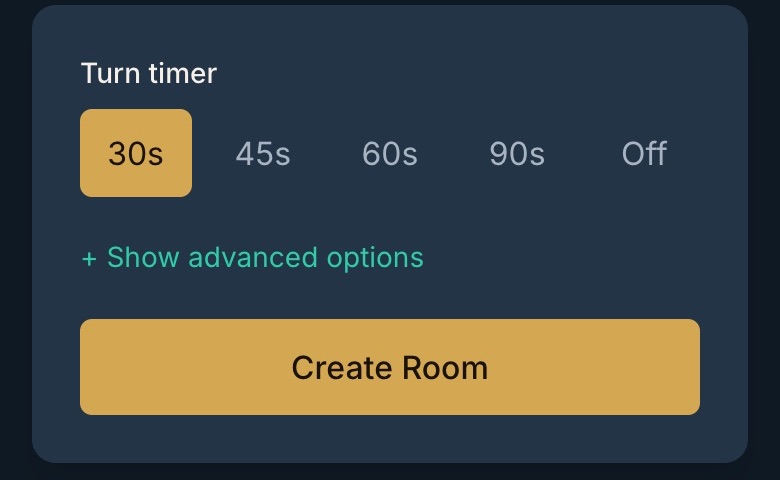
- Tap Create Room and enter a display name. No account is needed. Every room is a six-seat Points Rummy table, so a bigger group needs a second room or a poker table.
- Pick the turn timer for your slowest player. The choices are 30, 45, 60 or 90 seconds, or Off. 30 seconds suits regulars; 60 or 90 is kinder when someone is learning, and Off removes the clock entirely.
- Leave the advanced options alone for a first game. They include the room name (leave it blank and RummyDen picks one), the drop penalties, the points cap, printed jokers, chat and spectators. The full list, with defaults, is in what the host can change.
- You approve every seat. When a friend opens the link and picks a seat, they wait in the lobby until you let them in.
Poker table
Tap Create poker room on the home page. A short setup asks for a table name, then the settings:
- Ten seats, always. Two players are enough to start.
- Blinds and starting stack. The big blind defaults to 20 play chips, the small blind is always half of it, and your own stack defaults to 2,000. Other players pick a stack between 50 and 200 big blinds unless you change the range.
- Action timer. 15, 20, 30 or 60 seconds per decision; 20 is the default.
- Who can sit. Anyone with the link can take an open seat straight away. Turn on Host approves new players if you would rather let each person in yourself.
The straddle, rabbit hunting and an ante are set on the same screen; the Hold'em rules page lists every default.
Once the table exists, you get the one thing that does most of the work: a single invite link.
Step 3: Share the link in your group chat
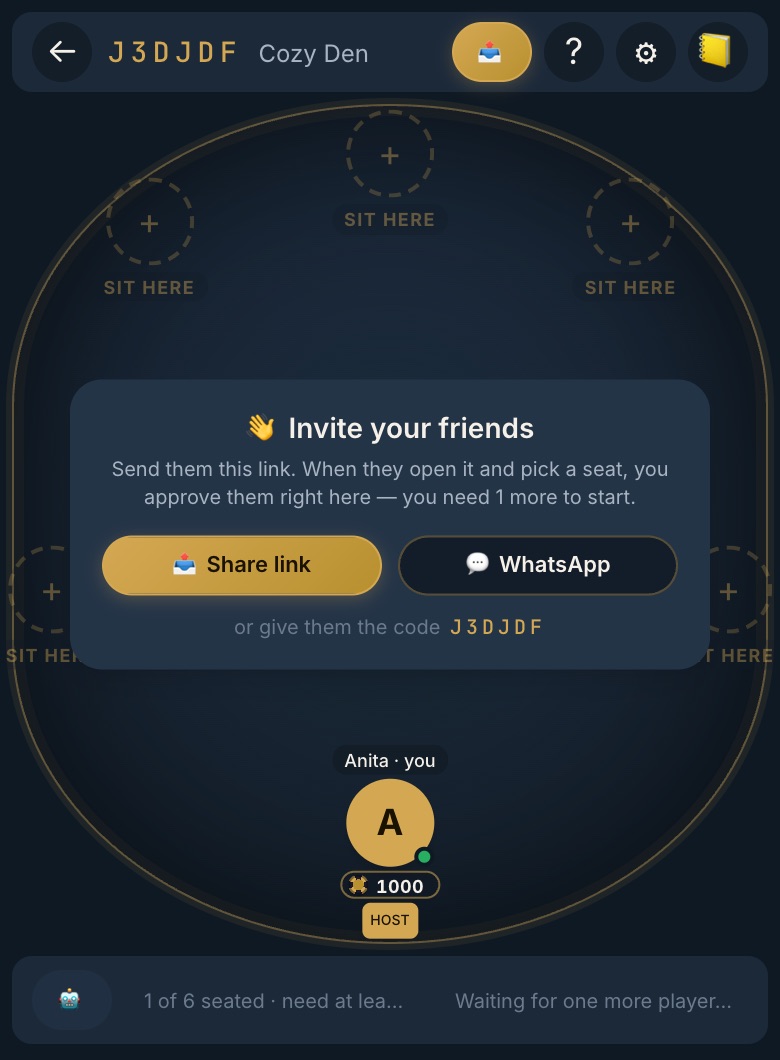
You do not chase people with accounts, passwords, or install instructions. In a rummy lobby, the WhatsApp button opens WhatsApp with the invite already written, so you only pick the group and send; Share link works with any app, and friends can also type the six-character code under Join Room. At a poker table, open Share Table to copy the link, the room code or a ready-made invite message, or tap Share via… on a phone.
A good invite message sets the tone and gives people just enough to say yes:
- Paste the room link at the top so it is impossible to miss.
- Say the game and the start time in one short line.
- Add a warm nudge, for example: "Free tonight? Grab a seat."
- Send it once, then resist the urge to spam. One clear message lands better than five.
Because the link is the whole invitation, latecomers can tap it and pick a seat without anyone re-explaining. In a rummy room they wait for your approval; at a poker table they sit straight away unless you turned on host approval.
Step 4: Get everyone seated
Ask each guest to enter a display name and pick a seat. In a rummy room the host must approve the request; opening the link alone does not seat a player, and you need at least two seated players before you tap Start game. If someone disconnects in Points Rummy before the next deal, they wait for a later round rather than receiving another hand while away. Reopening the room in the same browser can restore their session; a closed or expired room needs a new invitation.
At a poker table, each player taps an open seat and confirms their starting chips. Two seated players are enough, and the host starts the game from the table.
Give the group a minute or two of grace at the start, the way you would wait for the last carpool to pull in before serving dinner. A little patience here means nobody feels rushed or embarrassed for being three minutes late.
Once seats fill up, do a quick roll call in the chat: "Everyone see their cards? Good to go?" It takes ten seconds and it catches the friend whose screen froze or who is on the wrong table. Then deal the first hand and let the night begin.
Step 5: Set a relaxed, inclusive pace
The difference between a game night people want to repeat and one they skip next time is usually pace. Your job as host is to protect the easy rhythm.
- Do not rush the newcomer. If someone is learning, give them a beat to think. Everyone was new once.
- Offer a gentle tip, not a lecture. Point a first-timer toward rummy strategy or the poker hands ranking so they can level up between rounds without feeling put on the spot.
- Keep the chat kind. Tease, do not needle. The goal is that the person who lost the last hand still wants to play the next one.
- Take breaks. A five-minute pause for tea or a stretch keeps energy up over a long session.
How many rounds fit in an evening?
From real games on RummyDen, a round of 13-card rummy takes a median of about 4½ minutes, and the next round deals 15 seconds after a result. That gives a planning rule of thumb:
| Turn timer | Typical round | Rounds in an hour |
|---|---|---|
| 30 seconds | about 4 minutes | around 12–14 |
| 45–60 seconds | about 4¾ minutes | around 11–12 |
| 90 seconds | about 6 minutes | around 9 |
Bigger tables run longer — five players averaged about 6 minutes a round even on shorter timers — and breaks, chat and a first-time player will slow things further. If you want to finish by a set time, agree a number of rounds up front rather than "one more". Our rummy statistics have the full figures.
Your game-night checklist
Run through this before you send the invite and you will have covered everything that matters:
- Chosen the game (rummy for a gentle start, poker for a longer bluff-heavy night or a group of more than six)
- Created the rummy room or poker table and checked its settings
- For poker, decided whether to approve each new player yourself
- Copied the single invite link
- Posted one clear message to the group chat with link, game, and time
- Given latecomers a couple of minutes of grace
- Done a quick "everyone in?" roll call before the first deal
- Agreed on a relaxed pace and planned a short break for longer sessions
Wrapping up the night
End on a high note rather than letting the table slowly empty into silence. When people start to yawn, call it: "One last hand, then we call it a night." That final round gives everyone a clean finish and a shared moment to laugh about.
Before everyone leaves, ask whether the group wants another session and agree a time in everyone's local timezone. Hosts can use the homepage's recent-room option if the room is still available, or create a fresh one and share its new link. A private invite belongs in your group chat, not a public community post. Send reminders only to people who want them.
Afterward, a short message closes the loop, something like "Great table tonight, same time next week?" Setting up the room again takes a couple of minutes. When you are ready, create a free rummy room or a poker table and send that first invite.